













Blended Learning in Mathematics: How to Combine Print and Digital Resources Effectively
What is Blended Learning in Mathematics?
Blended Learning - blended learning - is a way of organizing teaching in which printed books, paper, face-to-face activities and digital platforms are used for different purposes but towards the same learning goal. The important point is not in what percentage of learning is on paper or on a screen, but in whether each format is helping students think, communicate and demonstrate understanding better.
In Math, a lesson can start with a presented situation, continue with students drawing a model and recording the solution on paper, then use digital tools to try out many cases, share products or submit cool-downs. These activities are not separate but need to form a unified learning circuit. Students switch formats, but don't have to start over or learn a different version of the same lesson.
Therefore, Blended Learning does not mean replacing books with devices. This is a deliberate role division between print and digital to both retain the depth of Mathematical thinking and take advantage of the media, interactivity, responsiveness and data that digital platforms can provide.
Blended Learning is not about digitizing all activities
When a school begins a digital transformation, the most obvious choice is often to put books, worksheets and tests on screens. However, the fact that a document appears as a PDF or a quiz is done online does not automatically make it blended learning. If students still only read instructions, follow samples and enter answers, technology mainly changes the means but not the quality of learning.
An effective blended model first answers three questions: what understandings do students need to form, what activities best reveal how they think, and what tools best support that activity. Only after identifying these three elements will teachers decide which parts should take place on paper, which parts should take place using a device, and which parts require face-to-face interaction in class.
1. Put the entire workbook to PDF: students still have to zoom in, scroll the page, and write elsewhere; experience may be less convenient than print without adding learning value.
2. Use video instead of all explanations: videos can provide context or illustration, but do not replace time for students to solve problems and discuss reasoning on their own.
3. Assessment with self-scoring questions for all goals: auto-scoring is useful with some question types, but many Math objectives still need to see models, reasoning, and how students connect representations.
4. Measure engagement by login time: students can stay on the system for a long time but think little. The more important evidence is the product, the explanation, the strategy, and the change in understanding.
Digitization is meaningful when digital tools open up things that are more difficult to do on paper, such as manipulating a dynamic model, viewing multiple plans of the whole class, receiving quick feedback or synthesizing data according to each learning goal. Parts that don't require that ability can still be done effectively with printed books, boards, scrap paper, or manipulatives.
Assign roles correctly for print books and digital platforms
There is no single formula that applies to all classes. However, schools can start by identifying the strengths of each format and agreeing on principles for use. This helps teachers avoid two extremes: relying entirely on books or putting students on screens most of the time just because the foundation is already in place.
1. Print and paper books: where students reveal their thinking processes
Writing paper creates a continuous space for students to take notes, try different ways, cross out, connect ideas, and juxtapose representations. In an open-ended problem, these traces show teachers where students started, how they changed their strategies, and where they are getting it wrong. The final answer only shows the result; The page usually shows the whole process.
Printed books are also convenient when students need to read a long task, go back to facts, compare multiple pictures, or work in pairs around the same product. Teachers can walk around the classroom, observe directly and choose some exercises to include in discussion. For children who are easily distracted, temporarily stepping away from the screen also helps focus on ideas instead of manipulating the interface.
1. Arguments and notes: write the steps, explain why, and highlight important facts.
2. Visual model: draw number lines, tape diagrams, arrays, area models, tables or graphs by hand.
3. Compare strategies: put two solutions side by side to recognize similarities, differences, and effectiveness.
4. Discussion products: uses real student work as the basis for lesson synthesis.
2. Digital platform: where media, interaction and data expand
Digital tools are valuable when they help students see a phenomenon, change parameters, try multiple cases, or get feedback that paper is difficult to provide immediately. Video can open up real-life contexts; virtual manipulatives and graphing tools allow students to observe change; The submission system helps teachers quickly view the whole class's work before deciding on the next question.
For teachers, the digital platform also supports organizing learning materials, assigning lessons, tracking completion and synthesizing partial data. However, data should only be seen as evidence for decision making, not the ultimate goal of the lesson. When the dashboard shows that a group of students incorrectly chose the same option, teachers still need to see how the students reason to know whether to re-explain, use a different model, or organize small-group support.
1. Media creates context: images and videos help tie the problem to a meaningful phenomenon or question.
2. Interactive tools: students drag, change, graph or experiment to recognize patterns.
3. Share products: teacher demonstrates, annotates, and connects multiple strategies in whole-class discussion.
4. Feedback and data: cool-down, checkpoint and digital submissions help identify support needs faster.
A useful rule of thumb is: if a digital tool doesn't make thinking clearer, engagement deeper, or data more actionable, the teacher shouldn't necessarily use it in that activity.
How can a lesson flow combining print-digital take place?
Blended Learning effectively is not a series of discrete activities: watching videos, doing workbooks, opening apps and submitting assignments. Each change of format needs to have a reason and still maintain the central question of the article. Below is a lesson flow that can be adapted for multiple grade levels.
1. Start with a thought-provoking situation
Teachers can use an image, short media clip, data or task statement to create learning needs. The warm-up should be clear enough for students to get started but not provide a ready-made procedure. After watching or reading, students record their observations and questions on paper or quickly discuss with friends.
2. Explore and document reasoning
Students work with workbooks, scratch paper, manipulatives or an appropriate digital tool. Whatever format you use, you need to create an observable product: a model, table, graph, expression, or explanation. Teachers monitor strategy instead of just checking speed of completion.
3. Share and connect strategies
Some products are selected to be shown or written on the board. Annotation tools can help teachers localize, connect steps, and juxtapose two representations. The goal is not to introduce as many solutions as possible, but to use solutions to clarify the learning goal, develop academic language, and help students see the connection between concrete, visual, and symbolic representations.
4. Practice with purpose
After synthesis, students need to practice to consolidate the ideas they have just formed. Some questions can be done on paper to keep the reasoning process going; Some questions can be taken on the platform to receive feedback or use tech-enhanced items. Practice should vary enough facts, representations, or contexts so that students have to apply them, not just repeat them.
5. Collect data at the end of the lesson
Cool-down or exit ticket focuses on a core piece of evidence of the learning goal. Students can submit online or on paper depending on classroom conditions. It is important that the teacher reads the results before the next lesson and decides: the class can continue, needs a warm-up to clarify misconceptions, or does a small group need individual support.
With this flow, paper and digital platforms do not compete. Paper helps keep the track of thinking; Digital helps expand experiences, collect products, and make data more visible. Lesson synthesis is the connection point for those experiences to become common understanding of the class.
Numerical data is only valuable when returning to the classroom
An often mentioned advantage of the digital classroom is the ability to quickly obtain data. However, dashboards do not automatically generate data-driven instructions. Data is only useful when tied to a learning goal, read with student work, and leads to a specific change in the next lesson.
Teachers do not need to react to every number. A few indicators may be enough to make a decision: completion rate, sample of incorrect choices, degree of response to standards, and student interpretation. When the data shows a problem, the next step is to determine whether the problem lies in calculation skills, conceptual understanding, reading, or representation.
1. Most of the class understood: continued, and at the same time prepared a short support for the few students who still had problems.
2. Many students have the same misconception: use a warm-up, model, or a sample assignment for the class to analyze the next day.
3. Results are correct but reasoning is weak: asks students to explain, compare, or switch to another representation.
4. Data is not clear enough: look at student work, ask a short question or observe the group instead of drawing conclusions from percentages alone.
Using data like this helps technology return to serving teaching. Teachers do not spend time looking at reports just to complete a management process, but use the right information needed to adjust pacing, grouping and support.

When print and digital are out of sync, what happens?
A school can own both print books and digital platforms but still not have Blended Learning. Problems often arise when two learning resources are developed or operated as two separate programs. Teachers have to connect them themselves, and students don't know how the activities on the screen relate to the page of the book they are studying.
1. Different lesson order: The book is in a task but the system displays different content or uses a different lesson division method.
2. Inconsistent language and symbols: the same concept is named, represented, or instructed in two ways, increasing cognitive load.
3. Teachers must assign assignments twice: Re-importing instructions, downloading files, or creating your own digital version causes blended learning to increase rather than decrease workload.
4. Data separated from teaching circuit: The online test measures a skill that does not coincide with the learning goal being studied, so it is difficult to use it to adjust the next day.
5. Students consider digital as a side part: If task number is not included in discussion or synthesis, you can easily complete it without connecting it to the main lesson.
These risks are not just technical issues. They break curriculum coherence and force teachers to choose between two versions. Print-digital alignment needs to be seen as consistency in goals, lesson flow, supporting language, assessment and pacing, not just the same content appearing in two places.
Principles to keep print-digital alignment
Before implementation, the academic team can choose a sample unit and go through it from teacher guide, student workbook to digital platform. Testing with a real workflow often uncovers more issues than looking at individual feature lists.
1. Same learning goal: every format must aim for the same understanding and success criteria.
2. Same task - discussion - synthesis circuit: digital should not interfere just because there is an attractive activity available but does not serve the lesson.
3. Same terminology and representations: vocabulary, patterns, and symbols need to be consistent so students can switch formats without relearning the language.
4. Assessment accurately measures what you just learned: number and cool-down questions must provide evidence directly related to the lesson goal.
5. Teacher workflow is simple: teachers see resources, assign assignments, and view data without having to maintain multiple systems or re-enter content.
If these five elements are kept, teachers can flexibly change the format according to class conditions without losing the instructional design. One class can do the task on paper, another class can use a device, but the two can still meet at the same synthesis and with the same learning evidence.
Checklist for implementing Blended Learning for schools
A blended learning model needs to be prepared simultaneously at three layers: infrastructure, professional workflow and classroom routine. The list below helps schools, teachers and IT/academic teams check for things that are easily overlooked before putting the program into widespread use.
1. Infrastructure and equipment
1. Is the equipment sufficient according to the usage pattern? Need to define one-to-one, use in pairs, groups or stations instead of defaulting to each operation requiring one machine.
2. Can Wi-Fi withstand access by all classes at the same time? Testing during rush hours and in the classroom itself is more realistic than speed testing in the office.
3. Are the screen, projector and sound appropriate? Media and whole-class displays need to be seen and heard clearly without taking a lot of time to set up.
4. Does the device have the necessary input tools? Students need to write expressions, draw, annotate or manipulate graphs, not just choose the answer.
5. Is there a procedure for charging, storing and disposing of defective devices? Some machines running out of battery can interrupt the entire lesson flow if there is no backup device or grouping method.
2. Account and access
1. List of classes and accounts created before the class day: Teachers should not spend the first period processing login for each student.
2. The rights of teacher, student and administrator are clear: avoid teachers not being able to view reports or students accessing the wrong content.
3. There is a solution for students who forget their password: The reset process needs to be quick and have someone responsible.
4. Check off-campus accessibility: only turns on when really needed and needs to clearly communicate to the family about the device, duration and support.
3. Professional process
1. Unify the mandatory and flexible parts: Teachers need to know which learning goals, tasks and syntheses must be kept, and which activities can be formatted.
2. Plan according to lesson flow instead of according to tools: does not start with the question "what app are you using today" but with the question "what do students need to do to understand".
3. Regulations on how to use data: determines which reports teachers view daily, which reports are used in the PLC, and which reports are for management.
4. Prepare the format conversion routine: how to play the device, scan the QR, save the lesson, switch to discussion, and put away the device needs to be taught as a classroom routine.
5. Actual workload assessment: tracks the time teachers spend preparing, assigning lessons, handling errors, and grading to see if the system really saves time.
4. Plan when connection is lost
1. Always identify the offline version of the core task: workbook, task statement or short sheet should be available if the lesson depends on a digital activity.
2. Preload important media when possible: Avoid letting an opening video decide whether the entire class can start or not.
3. There is a plan to share equipment: If some machines fail, students can work in pairs or stations while still keeping their roles clear.
4. Allow submission in many ways: students can complete on paper and the teacher enters or captures evidence once the connection is restored.
5. Synthesis protection: if the digital tool fails, teachers still need to spend time connecting strategies and nailing down core ideas instead of turning the class into technical waiting time.
A good backup plan doesn't try to replicate the entire digital experience on paper. It protects the part of learning that cannot be abandoned: the core situation or task, reasoning opportunities, discussion, synthesis and checking for understanding.
Role of school, teachers and IT/academic team
Schools need to identify blended learning as a pedagogical choice, not just a device purchasing project. Leaders should agree on implementation goals, appropriate screen time, metrics to track, and level of support for teachers. Class observations should focus on student thinking, task quality, and how data is used, not just on how often the platform is opened.
Teachers decide when each format creates a value. Students need to be given clear instructions: when to use the device to explore, when to close it to exchange, which products need to be saved on paper and which data will be used in the next lesson. When the routine is stable, the print-digital transition happens faster and does not lose the rhythm of thinking.
IT team is responsible for infrastructure, accounts, security and troubleshooting; The academic team is responsible for alignment, lesson flow, assessment and professional learning. The two groups need to test the same workflow from a teacher and student perspective. A platform can work well technically but still cause difficulties if the content does not match the book, and a good curriculum can also be difficult to implement if login and device are often interrupted.
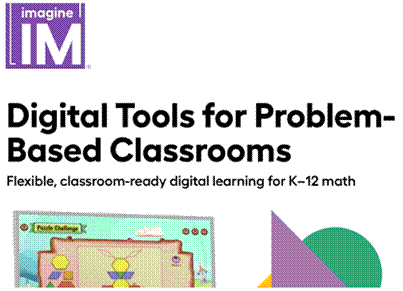
Imagine IM illustrates how to combine print and digital in the same lesson
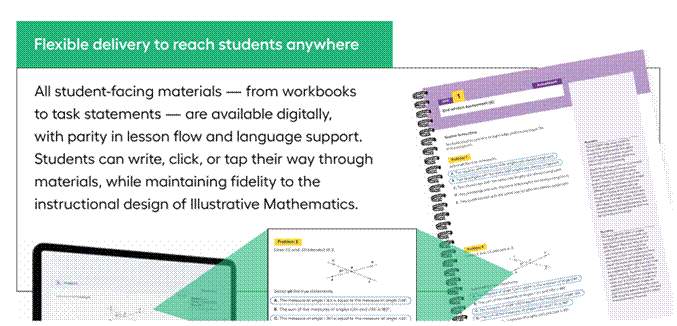
Imagine IM is an example that can be referenced when schools evaluate print-digital alignment for the Math program. According to the program's documentation, student-facing materials from workbooks to task statements all have digital versions, while maintaining similarities in lesson flow and language support. Students can write, click or tap depending on how the class is organized without having to switch to a different content program.
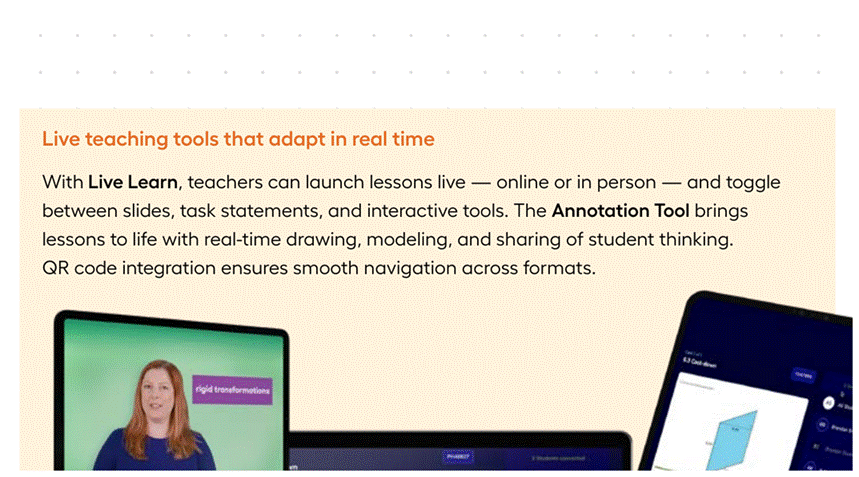
On the teacher side, the platform provides unit overviews, embedded guidance, Learning Narrative videos, editable lesson cards and assignment tools. During class, Live Learn allows switching between slides, task statements and interactive tools; Annotation Tool supports drawing, modeling and sharing student thinking in real time. These features make sense when used to support launch, monitoring, and synthesis, not to replace the teacher's role as coordinator.
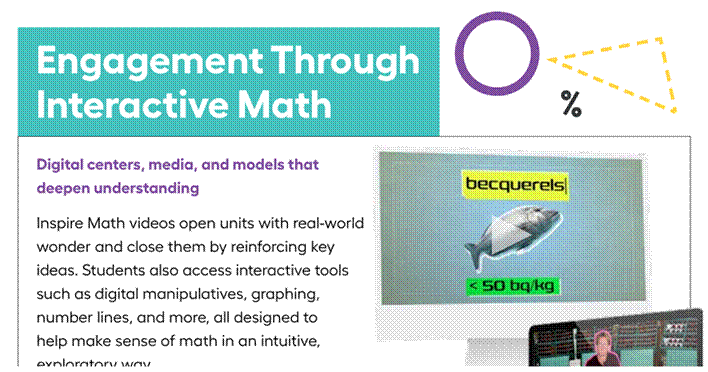
Regarding assessment, Imagine IM has digital cool-downs, checkpoints and end-of-unit tests, along with a dashboard that displays data by item, standard and level of completion. Teachers can use this information to choose warm-up, grouping or targeted support. In addition, video, digital manipulatives, graphing tools, number lines and digital centers create more options for parts that need media or interaction.
What's notable is not the number of individual features, but the ability to switch between print and digital while still maintaining the instructional design. The school still needs to see a specific lesson, try out the teacher workflow, test the infrastructure, and agree on how to use data before deciding on the appropriate deployment model.
Register for a free Trial account, demo book, quote:
Schools and teachers, please contact BooksVN, the designated distributor of Imagine Learning, in charge of countries including Vietnam, Philippines, Malaysia, Singapore, Hong Kong, Indonesia, India, Bangladesh, Cambodia, Laos, Japan and Taiwan through the following channels:
Website: www.booksvn.com Email: cs@booksvn.com
Mobile/WhatsApp: +84-915 920 514
Facebook: https://web.facebook.com/BooksVNeBooksachNgoaiVanchinhhang
Zalo OA: https://zalo.me/2230563715259512406


.svg)