












Science Teachers Spend Too Much Time Planning: What Should a Ready-to-Teach Program Include?
When the time to prepare lessons overwhelms the time to teach and give feedback to students
Reduce teacher load is becoming a de facto requirement at many schools. However, with Science, the workload often does not stop at writing lesson plans. Teachers also have to find the opening phenomenon, choose a suitable video, design an experiment, prepare materials, make slides, write worksheets, build rubrics and create assessments. When each lesson is assembled from many different sources, preparation time can be longer than the class itself.
The problem is not that teachers lack professional capacity. On the contrary, many teachers have good knowledge but have to spend too much energy on repetitive operations. A good video still needs to be checked for accuracy and copyright. An interesting experiment still needs a goal, safety instructions, and analysis questions. A beautiful worksheet still needs to be linked to the learning outcomes and evidence that teachers want to observe.
When preparation takes up the majority of time, activities with higher professional value are easily narrowed: reading student papers, giving personal feedback, analyzing misconceptions, adjusting questions, or supporting groups of students who are having difficulty. Therefore, a ready-to-teach curriculum not only helps teachers "prepare lessons faster". The greater value is in giving time back to teachers to focus on observation, feedback, and pedagogical decision-making.
“Invisible cost” of self-assembling resources from many sources
High resource usage is not always a problem. Teachers still need the right to choose appropriate learning materials for students. Risk arises when the entire program depends on each teacher finding, checking, and connecting each piece of content without a common structure.
1. Time to search and process resources: Teachers can spend hours watching multiple videos, reading multiple websites, editing formatting, cutting content, and converting documents into slides or worksheets that can be used in class.
2. Standard deviation between classes: Two teachers teaching the same grade can choose very different phenomena, difficulty levels and evaluation methods. Students are therefore unlikely to have access to the same knowledge and abilities.
3. Uneven quality: An online resource may be visually appealing but lacks scientific accuracy, is not age appropriate, or only illustrates knowledge without providing opportunities for students to investigate and reason.
4. Copyright and usage rights risks: Documents found on the Internet do not mean they can be copied, edited, distributed to students, or posted to the school's LMS system.
5. Assessment is separated from the lesson: If the activity, objective, and assessment are taken from three different sources, it is difficult for teachers to determine which knowledge, skills, and mastery the score is reflecting.
6. Difficulty in handing over and maintaining quality: When a teacher leaves or changes grades, many resources are scattered across personal computers, Drive folders, and private links. New teachers have to rebuild the process almost from scratch.
This cost often does not appear directly in the instructional materials budget, but is paid for by overtime, fatigue, and inconsistent implementation quality. Therefore, when comparing Science programs, schools need to look at both the cost of owning resources and the cost of operating the program throughout the school year.
What actually is a Ready-to-teach curriculum?
Ready-to-teach curriculum should not be understood as a hard script that forces the teacher to read each sentence on the slide. A program that can be implemented immediately should provide enough structure, materials, and assessment tools so that teachers do not have to build everything from scratch, but still allow for adjustment of duration, questions, level of support, and class format.
The balance point lies in two factors. First, the program must ensure consistency: goals, activities and assessments all aim at the same output standard. Second, teachers still retain professional autonomy: they can shorten, expand, change student groups, add local examples or choose a presentation suitable for the classroom context.
In other words, “ready-to-teach” does not mean that teachers do not need to prepare. It means that preparation time is shifted from producing basic materials to more valuable decisions, such as predicting student difficulties, choosing leading questions, planning differentiation, and determining the type of feedback to give.
Checklist of minimum resources of a ready-to-teach program
A program with many videos or many pages of documents does not necessarily help reduce lesson planning. Teachers need a system of resources that can be used in the right flow of work. Below is the minimum checklist schools should check before choosing a Science program.
1. Scope and sequence are clear: The program needs to indicate which modules are studied at each grade, the expected duration, the standards of knowledge and competencies developed, and show the continuity between grades. Teachers must see the whole year's picture before going into each lesson.
2. Learning objectives and evidence to collect: Each lesson or session needs to state what students must understand, what they can do, and what answer, model, data, product, or performance task they will demonstrate.
3. Instructions for each session: Teacher guide should have duration, sequence of activities, leading questions, points to observe, common misconceptions and transition suggestions between Engage, Explore, Explain, Elaborate and Evaluate. This structure helps teachers know the purpose of each step instead of just receiving a list of activities.
4. Materials list and organization instructions: A hands-on investigation should clearly state consumable materials, reusable materials, group quantities, preparation time, safety requirements and alternatives when the classroom does not have enough equipment.
5. Student materials and media placed in the correct location: Worksheets, scientific text, videos, data, numerical simulations, and student guides should be directly linked to the corresponding session. Teachers should not have to open multiple folders to guess which resources will be used first, later, or for what purpose.
6. Answer, exemplar and rubric: Answers are not just for marking right or wrong. Teachers need answer samples, assessment criteria, performance levels and examples of strong enough evidence to enable consistent feedback across classes.
7. Comprehensive assessment system: Pre-assessment, exit ticket, formative assessment, summative assessment and benchmark need to be linked to the content learned. Data must help teachers identify where students are struggling with scientific knowledge, language, or the ability to use evidence.
8. Differentiation resources and language support: A Science class often has many different reading levels, vocabulary, and confidence levels. The program should have scaffolding at the right point of use, multimodal resources, and expanded options for students who need more challenge.
This checklist helps differentiate a large content repository from a truly deployable program. The content warehouse requires teachers to build their own paths. Ready-to-teach curriculum has a designed path, but still allows teachers to choose the appropriate pace and support.
Do Dashboard, Lesson Explorer and Assessment Center reduce administrative work?
A digital platform is only valuable when it shortens the number of steps teachers have to take. Having many menus does not necessarily mean good workflow. Schools should observe how teachers go from yearly plans to daily lessons, assign tasks, review lessons, and use assessment results.
Dashboard should help teachers quickly see the classroom, assigned lessons and tasks that need to be handled. Lesson Explorer should allow you to go from grade, module, lesson to session without wasting time finding files. Assessment Center needs to gather assessments, rubrics and results in one place. Class management should support layering, grouping, assigning content, and tracking progress without requiring multiple data re-entry.
A simple test is to ask new teachers to find and prepare a lesson they have never seen before. If they can identify goals, load or open resources, view materials, understand assessments, and deliver within a reasonable amount of time, the system is supporting lesson planning. If teachers still have to ask many people, open dozens of tabs or recreate worksheets themselves, the new platform only stores content and doesn't really reduce the load.
Onboarding, Help Center and professional learning are equally important as content
A program with good content can still fail if teachers do not know where to start. Especially in the first weeks, teachers need to understand how the program organizes modules, how to find lessons, how to use teacher resources, how to assign lessons, and how to read assessment results.
Effective onboarding doesn't need to be too long. A series of short videos, a welcome tour of the platform, step-by-step instructions, and a Help Center with a search function are often more useful than a training session filled with too much information. Teachers need to learn the right content at the right time: before planning the school year, before the first lesson, before the first assessment, and when starting to use data to differentiate.
Professional learning should also go beyond button pressing instructions. Teachers need to understand the teaching philosophy, the role of the phenomenon, how to ask Driving Questions, how to support scientific discourse and how to use formative assessment. By understanding the reasoning behind the curriculum structure, teachers can adjust lessons without losing sight of the core goals.
How to evaluate whether a program really saves time
Instead of just looking at the brochure or the number of resources, the school can do a small pilot with a module or a lesson. Let teachers experience the workflow for themselves and record the time needed for each task.
1. Planning: How long does it take teachers to understand the goals, process and prepare for the first session?
2. Prepare materials: Is the materials list clear enough for lab staff or teachers to prepare without having to guess?
3. Find resources: Are slides, videos, student sheets, scientific text, answers and rubrics in the correct location or do you have to search through many folders?
4. Adjust the lesson: Can teachers shorten, expand, or differentiate while still seeing relevant goals and assessments?
5. Assigning assignments and class management: Is it convenient to assign content to the whole class, small groups or individual students?
6. Rating and feedback: Do rubrics, examples and data help teachers respond faster but still have enough depth?
7. Handing over to other teachers: Can a new teacher take over a class or module without depending on the previous teacher's personal folder?
After the pilot, schools should ask not only “do teachers like the program?” but also “how many hours does the program save each week, what activities are those hours transferred to, and does the quality of student feedback improve?”. This is a way to turn the concept of reducing teacher load into criteria that can be observed and evaluated.
Save time but still maintain professional autonomy
A program that is so fragmented that teachers have to build everything themselves. Conversely, a script that is too rigid can turn the teacher into someone who carries out a process that is not adjusted to the classroom. A good ready-to-teach curriculum needs to lie between these two poles.
Teachers should be able to view the entire lesson flow, understand the goals of each activity, select appropriate resources, adjust duration, and assign different tasks to groups of students. Required sections should be distinguished from optional or extension sections. When changing an activity, teachers must still know what evidence of learning needs to be retained to ensure alignment.
Therefore, the important criterion is not "how much work the program has done for teachers", but "how many repetitive tasks the program has eliminated so that teachers have more time to make professional decisions".
An example for reference: teacher workflow in Twig Science
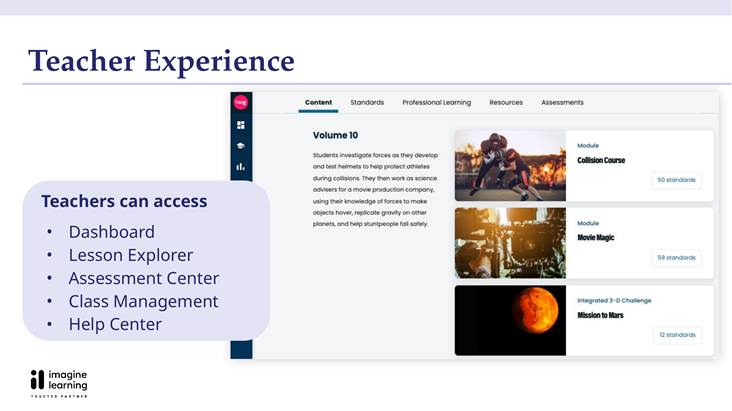
A program that can be used for reference according to the above criteria is Imagine Learning Twig Science. In the system for teachers, Teacher Edition and the digital platform are organized in areas such as Dashboard, Lesson Explorer, Assessment Center, Class Management and Help Center. The goal of this organization is to help teachers go from planning to lesson and assessment in the same workflow, instead of assembling many separate tools.
Lesson Explorer allows teachers to access content by grade, module, lesson and session. At each level, teachers can view goals, related standards, key vocabulary, activities, media and assessment. This structure does not eliminate the lesson planning role, but reduces search time and helps teachers see connections between parts of the lesson.
From lesson planning to assessment in the same workflow
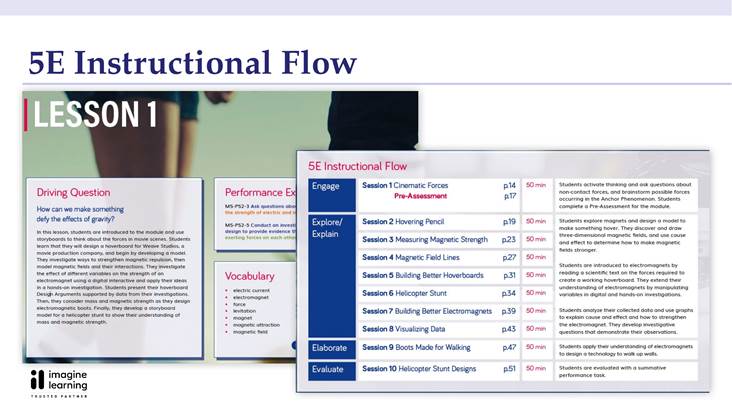
In Twig Science Grades 6-8, lessons are presented according to instructional flow 5E over many sessions. Teachers can preview Engage, Explore, Explain, Elaborate and Evaluate steps, along with Driving Questions, performance expectations and vocabulary. This is an example of how the program makes the purpose of each session clear before the teacher enters the classroom.
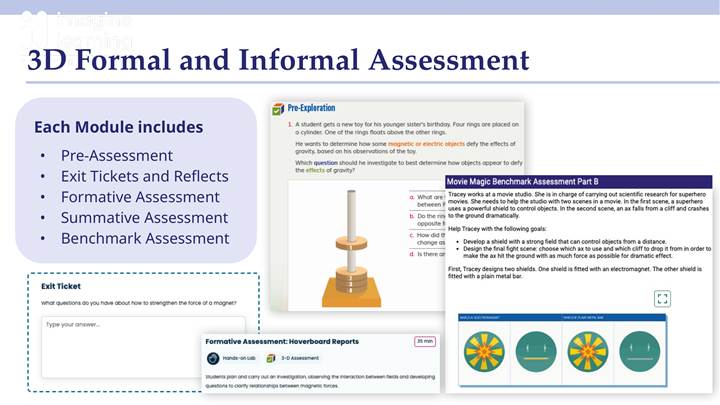
Assessment is also placed in the learning process instead of only appearing at the end of the module. The program's introductory document states forms such as pre-assessment, exit tickets and reflections, formative assessment, summative assessment and benchmark assessment. When rubrics and assessments are directly linked to lessons, teachers have more basis to identify misconceptions, adjust lessons and give feedback to students without having to build the entire assessment system themselves.
Onboarding so teachers can get started quickly
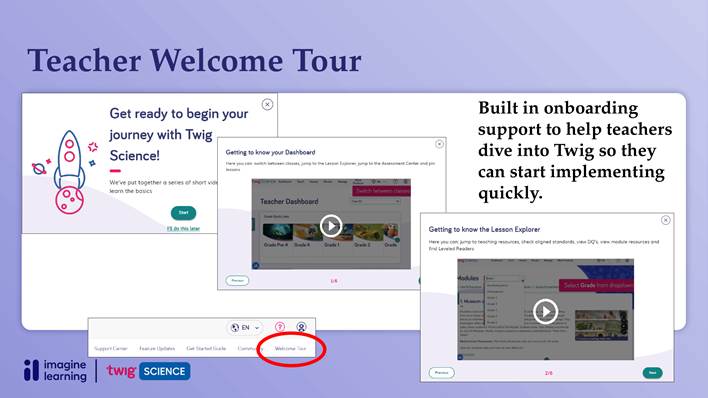
Twig Science also has a Teacher Welcome Tour that includes short videos introducing Dashboard, Lesson Explorer, Lessons, Assigned Lesson Center, Teach and Present Mode and Assessments. This is a small detail but worth considering when evaluating the program: new teachers can learn the basic operations right in the platform and return to the Help Center when needed, instead of depending entirely on a single training session.
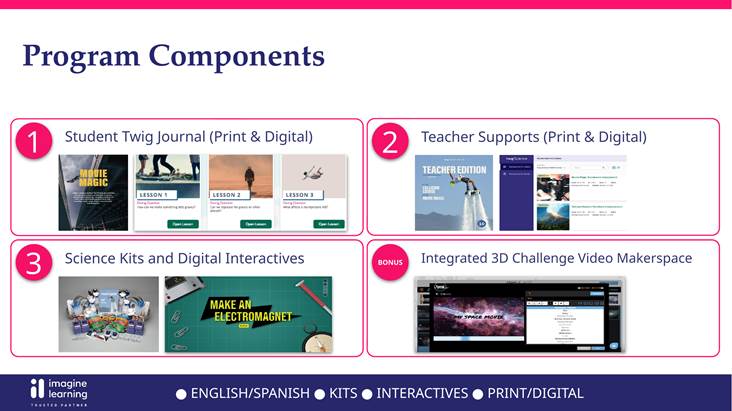
Besides the platform, the program combines Student Twig Journal, Teacher Supports, science kits, digital interactives and print/digital resources. Having components designed according to the same structure can help reduce the amount of separate documents teachers have to create themselves. However, schools should still directly check a specific grade and module to determine the appropriate level for the time, facilities and level of their students.
Twig Science is suitable for which schools?
Twig Science can be a reference choice for international schools, bilingual schools or units that want to deploy Science in the direction of phenomenon-based, inquiry-based learning and three-dimensional learning. The program is especially suitable for schools that need a unified structure across grades, clear teacher resources and assessment integrated into lessons.
For schools that are facing a situation where each teacher builds their own set of lessons, the pilot can focus on three questions: how much time is reduced to prepare a session, is it easy for teachers to adjust lessons, and does assessment data help students respond faster. Answers from teachers directly using them will be more valuable than simply comparing the number of videos, worksheets or pages of materials.
No program is completely “plug and play” in every context. The school still needs to determine scope, duration, teaching language, science kits, digital infrastructure and professional development plan. The point to look for is a program that is ready enough to reduce repetition, but flexible enough for teachers to adjust to students and school goals.
Register for a free Trial account, demo book, quote:
Schools and teachers, please contact BooksVN, the designated distributor of Imagine Learning, in charge of countries including Vietnam, Philippines, Malaysia, Singapore, Hong Kong, Indonesia, India, Bangladesh, Cambodia, Laos, Japan and Taiwan through the following channels:
Website: www.booksvn.com Email: cs@booksvn.com
Mobile/WhatsApp: +84-915 920 514
Facebook: https://web.facebook.com/BooksVNeBooksachNgoaiVanchinhhang
Zalo OA: https://zalo.me/2230563715259512406


.svg)