













Universal Design for Learning (UDL): Designing Lessons That More Students Can Access
UDL is not about making a lesson “easier” for everyone
In the same class, there are students who read quickly but have difficulty expressing themselves in writing; Some children understand ideas when heard but are slow when having to process a long page of text; There are ELL students who grasp concepts but have trouble with academic vocabulary. If the lesson has only one approach and one answer, the barriers of the task can obscure the students' true abilities.
Universal Design for Learning (UDL) is a way of designing goals, materials, activities, and assessments from the beginning so that many learners can participate. The focus is not on creating a separate program for each group, but on proactively providing purposeful options for students to access content, demonstrate understanding, and stay motivated.
UDL is closely tied to inclusive education and accessibility: same learning goals, but students may need audio, images, graphic organizers, visual manipulatives, or additional review opportunities. Teachers still maintain output standards; Flexibility is the path to help students progress toward that standard.
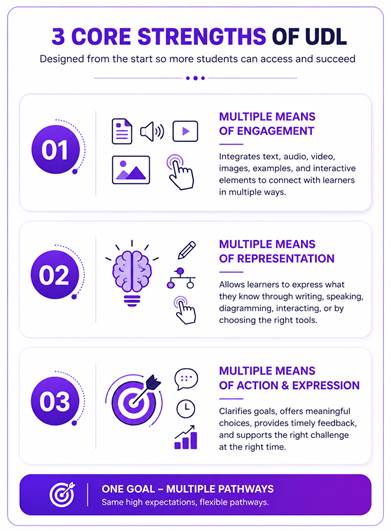
The three core spirits of Universal Design for Learning
A UDL lesson does not need to integrate all tools at once. Teachers should start from the goal and choose options that truly remove barriers. The following three spirits are important thinking frameworks:
1. Multiple means of representation: The same concept can be presented with text, voice, video, images, models and examples. The goal is to reduce barriers due to format, not force all students to use the same medium.
2. Many ways to act and express - Action & expression: Students can demonstrate understanding by writing, speaking, diagrams, operations, or digital products depending on their goals. Teachers need to distinguish between the skill being assessed and the means used to answer.
3. Many ways to motivate - Engagement: Clear goals, limited choices, timely feedback, and appropriate levels of challenge help students maintain effort. The appeal comes not only from gamification but also from the feeling of being able to progress.
These three spirits do not operate separately. A video with subtitles not only opens up more ways to access the content, but also helps students actively review it; A graphic organizer not only supports understanding the lesson but also provides a way to express thinking before moving on to the finished article.
The important point is not to equate “more options” with reduced requirements. Students can listen to the text instead of just reading it silently, but still need to analyze the main ideas; You can present it with a diagram first, but in the end you still have to prove that you understand the concept correctly.
Common barriers in a diverse classroom
Many difficulties are easily interpreted as lack of concentration or effort, when the real cause may lie in the way the material is presented. A student who reads slowly must spend too much energy decoding words so there is not enough "capacity" left for analysis. ELL students may understand the ideas but not the keywords in the topic. If you lack a foundation, you can be blocked right at the beginning even though the target mission is not too difficult.
UDL asks teachers to look at the interaction between the learner and the task: what is creating barriers, what tools can remove it, and what evidence shows that students are actually making progress. The same child may need support with long reading but be completely independent when modeling or discussing verbally.
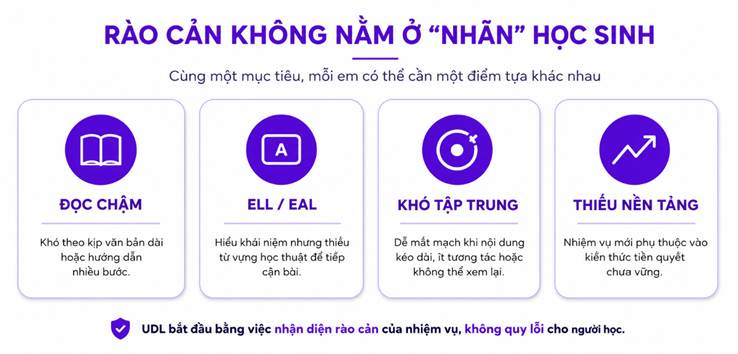
Design from barriers, not from student "labels".
Teachers do not need to wait for an official diagnosis to apply UDL. An effective process begins with analyzing goals and predicting areas that might stop many students before they can demonstrate their knowledge.
1. Determine core output standards: Ask students what they should understand or be able to do at the end of the lesson. Separate the objective from the presentation; If the goal is to understand cause-effect relationships, reading small print on a long page should not become an unintended barrier.
2. Predicting barriers to learning materials and activities: Consider text length, vocabulary density, number of steps in instructions, video speed, memorization requirements, and content control. These often affect many students, not just one group.
3. Preparing to choose a targeted approach: Choose audio, subtitles, images, vocabulary support, or visual manipulatives because they help achieve the goal, not just to make the lesson “more techy.” Options should be easy to find and have clear instructions for use.
4. Allow many ways of expression but keep the same criteria: A student can explain verbally before writing; Another student uses a graphic organizer to organize ideas. Rubric still needs to evaluate the same knowledge and level of reasoning.
5. Follow evidence to correct: Observe what supports students use, whether they are making progress, and whether they can cope with changes in context. This data decides which scaffolds should be kept, reduced, or replaced.
Practical scaffold set for Reading and Math lessons
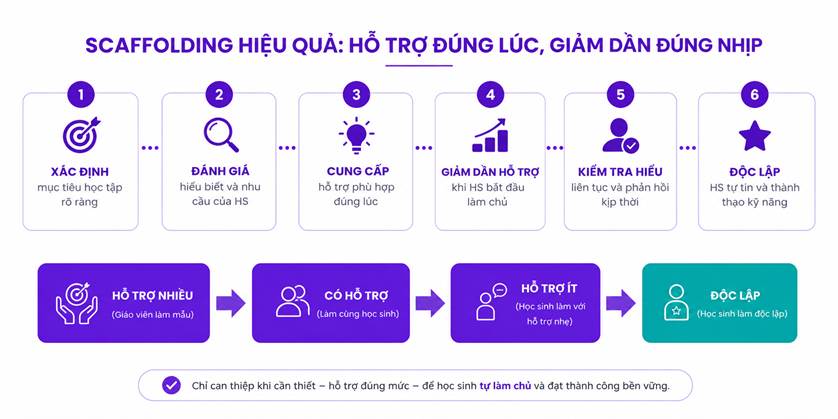
Scaffolding is a temporary support that helps students perform a task that they cannot yet complete independently. Good Scaffolds must be associated with specific barriers, appear at the right point and not replace the learner's core thinking.
1. Audio and text-to-speech: Supports slow readers, ELLs, or learners who need to listen to instructions again. Audio should be in sync with the text and allow for pause, adjustment or playback.
2. Video and multimedia: Use animations, explanations, and examples to clarify the process. Students need permission to stop, rewind, and watch segments; Video should not just serve a decorative role.
3. Vocabulary support and on-site suggestions: Explain keywords, provide examples or prompt strategies right where students encounter difficulty. On-site support reduces the need to leave the mission to find another tool.
4. Graphic organizer and visual scaffold: Sequence diagrams, comparison tables, part-whole models, and argument frameworks help students see the structure of ideas before handling complex requirements.
5. Manipulatives and interactive operations: In Math, numeric objects, number lines, fraction models, or drawing tools help connect symbols to concepts. Students need to have the connection explained, not just drag and drop to find the answer.
Scaffold must be gradually reduced to avoid creating dependencies
A useful support in the first week can become a new barrier if left in place for too long. When students always receive keywords, sentence frames or step-by-step solutions, they can complete the activity but have not yet developed the ability to choose their own strategies.
Therefore, teachers need to view scaffolding as a "scaffold": built up for learners to reach the task, then gradually withdrawn as capacity increases. Reducing support is not based on feelings but on evidence from work, observations and short mastery checks.
A path to reducing scaffolding can go from the teacher modeling, to prompting with questions, to short signals, and finally asking students to work independently. If results drop sharply after support is withdrawn, the teacher needs to determine whether to restore part of the scaffold or reteach the underlying skill.
• Access: Can students access instruction and content without being blocked by unnecessary formatting?
• Accuracy: When using the scaffold, do you perform the target skill correctly at a stable rate?
• Independence: Which level of suggestion is minimal but still helps students start and complete the task?
• Transfer: When changing facts, contexts or forms of presentation, can you apply the knowledge?
By tracking both accuracy, independence, and transfer, teachers avoid two extremes: withdrawing support too early, causing students to fail, or withholding support too long, causing them to become dependent. The ultimate goal of accessibility is not for students to always need tools, but for tools to help them move toward greater autonomy.
When should teachers keep, reduce, or change scaffolds?
There is no fixed schedule suitable for all students. Teachers need to observe data for each skill and make flexible decisions. A scaffold should be reconsidered when the following signs appear:
1. Students achieve consistent results with fewer reminders: Reduce from a step-by-step guide to a suggested question, then move to a short signal. If accuracy is maintained, the level of independence is increasing.
2. Students choose the right tool: Once you know when you need a graphic organizer, when you need to listen again, or when you can remove the support, the teacher can transfer control to the learner.
3. Support no longer adds value: If students skip the audio, don't use scaffolds, or complete things quickly but still accurately, holding a mandatory scaffold can slow progress and reduce motivation.
4. Students can only do this when the scaffold is intact: This is a sign that you should not withdraw completely. Teachers need to check background skills, reduce each part and use mastery checks to determine the breaking point.
5. Students move to new tasks but lose orientation: It may be necessary to change the type of scaffold instead of increasing the number of supports. For example, remove sentence frames but keep structural diagrams; Reduced sample examples but added self-test questions.
Reducing scaffolding does not necessarily have to happen all at once. Teachers can withdraw suggestions from familiar practice sections but still keep vocabulary support as students move on to more complex texts. Conversely, a student may no longer need audio but still need a graphic organizer to organize arguments.
Technology can help maintain many forms of support and provide fast data, but should not automatically be synonymous with UDL. A good platform must allow students to control the experience, allow teachers to observe progress and facilitate changes in the level of support according to actual needs.
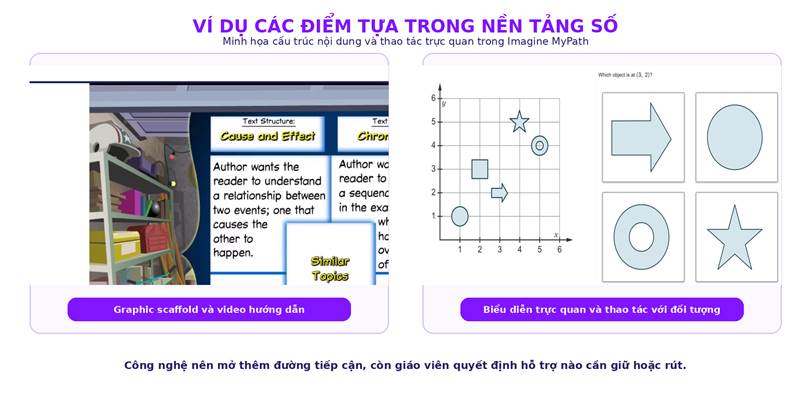
How does Image MyPath illustrate how UDL is brought to digital platforms?
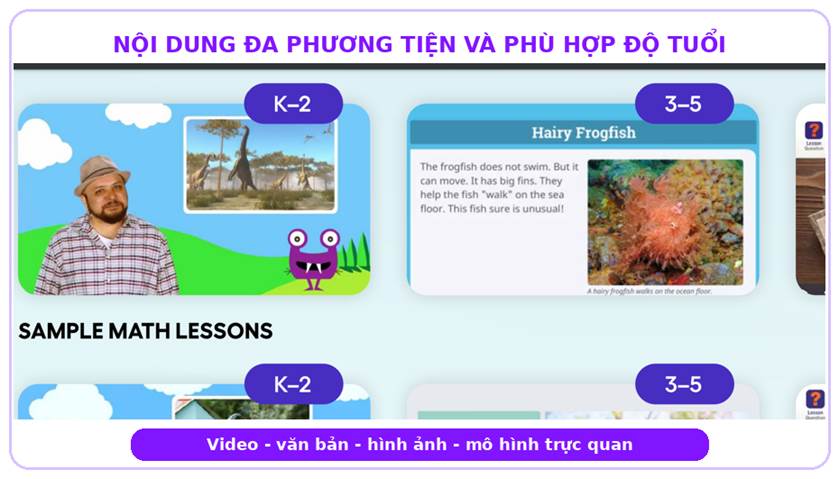
Imagine MyPath is a personalized learning program for Reading and Math K-12. Design lessons that combine video, audio, text, images and narration; Students can stop, rewind, or review content. These options open up additional access without changing the skill target.
In lessons, MyPath uses scaffolds such as linked vocabulary, metacognitive bubbles, graphic organizer, calculator, graphing tools and interactive manipulatives. The system also has text-to-speech and language display support, helping students access instructions and content more conveniently in appropriate situations.
Content presented is appropriate for the student's age even if the skill level is below the current grade. Individual Learning Path and adaptability help prioritize essential content; Proficiency test scores provide data to determine whether a student can move forward or needs additional instruction, practice, or teacher support.
MyPath should be seen as an example of how digital platforms can support UDL, not a tool that replaces pedagogical decisions. Teachers still need to identify goals, check for transferability, and proactively reduce scaffolding when students are ready.
Checklist UDL for a digital learning platform
Before choosing tools for inclusive education, teachers and schools can use the following questions to evaluate whether the platform truly increases accessibility or just adds format:
• Are learning objectives clearly stated and separated from the learning material format?
• Can students access the content through multiple media such as text, audio, video, or images?
• Do learners have the right to stop, rewind, adjust or review content as needed?
• Does the platform have vocabulary support, graphic organizers, manipulatives or scaffolds at the right points?
• Can teachers track data, assign content individually, and identify students in need of support?
• Is the content age-appropriate even if students are learning skills below grade level?
• Can Scaffolds be reduced, removed, or changed as students progress, instead of being fixed to every lesson?
BooksVN can provide UDL assessment checklist for digital platforms and advise on Imagine MyPath pilot accounts before schools widely deploy.
Register for a free Trial account, demo book, quote:
Schools and teachers, please contact BooksVN, the designated distributor of Imagine Learning, in charge of countries including Vietnam, Philippines, Malaysia, Singapore, Hong Kong, Indonesia, India, Bangladesh, Cambodia, Laos, Japan and Taiwan through the following channels:
Website: www.booksvn.com Email: cs@booksvn.com
Mobile/WhatsApp: +84-915 920 514
Facebook: https://web.facebook.com/BooksVNeBooksachNgoaiVanchinhhang
Zalo OA: https://zalo.me/2230563715259512406


.svg)